AgentRegistry + Claude Code: A Developer's Guide to Team-Wide Skill Distribution
Your team has five engineers using Claude Code. Each of them has built their own skills — internal design system patterns, API scaffolding conventions, deployment checklists. These skills live as SKILL.md files scattered across individual machines and project repos, with no shared discovery, no versioning, and no way to know if someone else already wrote the skill you need. When a new engineer joins, they start from scratch.
This is the skill distribution problem, and it gets worse as teams grow. Claude Code’s native skill system is excellent for individual productivity, but it was not designed to be a team-wide package manager. There is no npm install for skills. No docker pull. No central catalog where a platform team can curate what’s approved and what isn’t.
AgentRegistry is an open-source project from Solo.io that fills this gap. It provides a centralized registry for managing AI artifacts — MCP servers, agents, and skills — with publishing workflows, versioning, and team-wide discovery. What follows is the full lifecycle: authoring a custom skill, publishing it to AgentRegistry, and pulling it into a Claude Code project.
What Is AgentRegistry?
AgentRegistry is an open-source project (Apache 2.0) that Solo.io launched at KubeCon + CloudNativeCon North America 2025. The pitch is straightforward: it is Docker Hub for AI workloads. Instead of managing container images, you manage three types of AI artifacts — MCP servers (runtime tool endpoints), agents (complete AI applications), and skills (knowledge and capability bundles that teach agents how to do things).
AgentRegistry is one of several related open-source projects in the Solo.io ecosystem. kagent provides a Kubernetes-native AI agent runtime. agentgateway acts as a reverse proxy for MCP traffic, adding observability and routing. AgentRegistry sits at the center as the metadata catalog — the place where teams publish, discover, and govern their AI artifacts. Each is a separate project; you can use AgentRegistry standalone.
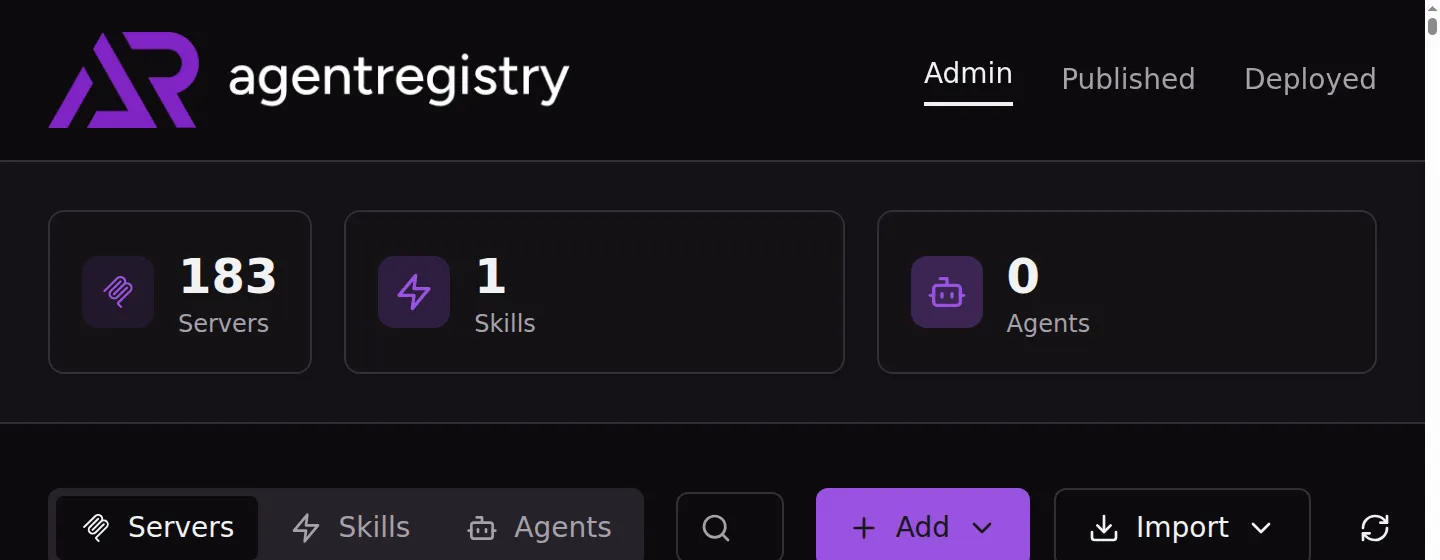
Under the hood, AgentRegistry consists of a Go-based CLI (arctl), a registry server with a REST API and MCP endpoint, a PostgreSQL database with pgvector for semantic search, and a Next.js web UI. The entire stack runs locally via Docker Compose with a single command. On first invocation, arctl auto-starts the registry daemon, seeds it with built-in MCP server data, and serves the web UI on http://localhost:12121.
An important distinction: AgentRegistry is a metadata registry, not an artifact store. When you publish a skill, the CLI builds a Docker image and pushes it to an external OCI-compatible registry (Docker Hub, GitHub Container Registry, AWS ECR, or even a local registry:2 container). AgentRegistry stores only the metadata — name, description, version, and a pointer to that Docker image. As the documentation notes, “Dockerhub is the dependency as agentregistry doesn’t store container images. It has a pointer to the container image that was built (for the Skill) in Dockerhub.” This means you can use whatever OCI registry your organization already trusts for artifact storage.
How Skills Work (and Why They Are Not MCP Servers)
First, some context on what a skill actually is and how it differs from the MCP servers you may already be using with Claude Code.
The Agent Skills format is an open standard that has been adopted by 27+ tools, including Claude Code, Cursor, GitHub Copilot, VS Code, OpenAI Codex, Gemini CLI, and more. A skill is defined by a SKILL.md file with YAML frontmatter and markdown instructions, optionally accompanied by reference files, scripts, and templates. Skills follow a simple directory convention:
my-skill/
  SKILL.md          # Core definition: metadata + instructions
  Dockerfile        # Build configuration (FROM scratch)
  references/       # Additional docs loaded on demand into agent context
  scripts/          # Executable code the agent can run (Bash, Python, JS)
  assets/           # Templates, images, data files, boilerplate
The directory structure matters for more than organization — it controls how the agent loads context. The spec uses a progressive disclosure model: skill metadata (~100 tokens) loads at startup for matching, the full SKILL.md body (under 5,000 tokens) loads when the skill activates, and the contents of references/, scripts/, and assets/ load only when the agent actually needs them. This means a well-structured skill minimizes context window consumption by keeping the main instructions lean and pushing detailed reference material into separate files.
These supporting files are not auto-loaded or auto-executed. The agent discovers them through explicit references in the SKILL.md body itself — you tell the agent what files exist and when to use them, using relative paths from the skill root. The spec defines the convention:
See [the reference guide](references/REFERENCE.md) for details.

Run the extraction script:
scripts/extract.py
This is the key mechanism: the SKILL.md instructions are where you wire everything together. When the agent reads the skill body and encounters a reference to references/component-patterns.md, it loads that file into context. When it sees an instruction to run scripts/validate-theme.sh, it executes that script. The progressive disclosure model ensures these files are only loaded when the agent reaches the instruction that references them — not upfront when the skill activates.
The references/ directory holds additional documentation the agent reads on demand. For a design system skill, this might be references/design-tokens.json with the complete color specification as structured data, or references/component-patterns.md with copy-pasteable HTML templates for each component type. You would reference these from the SKILL.md body with instructions like “Before generating a component, read references/component-patterns.md for the canonical markup patterns” or “Use the token values defined in references/design-tokens.json for all color decisions.” The spec recommends keeping individual reference files focused and small — since agents load them into context as needed, smaller files mean more efficient use of the context window.
The scripts/ directory contains executable code the agent can run — Bash scripts, Python utilities, JavaScript modules. Scripts are invoked when the SKILL.md instructions tell the agent to run them. For example, a design system skill might include the instruction “After generating any component, run scripts/validate-theme.sh against the output file to check for prohibited CSS classes” — the agent would then execute that script, read its output, and fix any violations it reports. Scripts should be self-contained (or clearly document their dependencies), include helpful error messages, and handle edge cases. The supported languages depend on the agent runtime; Claude Code can execute anything available in the user’s shell.
The assets/ directory holds static resources: templates, images, data files. Assets differ from references in that they are not documentation to read but artifacts to use — files the agent copies, transforms, or includes in its output. A design system skill might include assets/starter-template.html with the dark theme boilerplate already wired up, and the SKILL.md would instruct the agent: “When creating a new page, start from the template at assets/starter-template.html rather than building from scratch.”
The distinction between skills and MCP servers is important. An MCP server is a running process that exposes tools — a GitHub API wrapper, a database connector, a filesystem interface. A skill is a static knowledge bundle — markdown instructions that teach the agent how to use those tools effectively for a specific domain. If MCP servers are the instruments, skills are the training on how to play them. Skills are not running services. They are context that gets loaded into the agent’s prompt.
Claude Code’s native skill system stores these files at specific paths (~/.claude/skills/ for personal, .claude/skills/ for project-scoped) and loads them based on their description when relevant. This works well for individual use. The gap is distribution: how do you share a skill with your team, version it, and ensure everyone is using the approved version? That is what AgentRegistry adds.
The Walkthrough: From Authoring to Consumption
We will build a skill called lumiverde-ui — a component generator that teaches Claude Code to produce UI components following the design system of Lumiverde Labs, a fictional sustainability technology company. The skill enforces a dark-themed interface with lime-green accents, the kind of opinionated brand identity a frontend platform team would want applied consistently across projects. We chose a deliberately striking visual system to make the before/after comparison unmistakable.
Step 1: Scaffold the Skill
AgentRegistry’s CLI provides a scaffolding command that creates the standard skill directory structure:
$ arctl skill init lumiverde-ui --no-git
✓ Skill "lumiverde-ui" initialized successfully!

$ tree lumiverde-ui/
lumiverde-ui/
├── Dockerfile
├── LICENSE.txt
├── SKILL.md
├── assets/
├── references/
└── scripts/
This generates a skeleton with SKILL.md, Dockerfile, LICENSE.txt, and placeholder directories for scripts, references, and assets. The --no-git flag skips initializing a git repository inside the skill directory, which is useful when the skill lives within an existing repo.
Step 2: Define the Skill
The heart of any skill is its SKILL.md file. The YAML frontmatter provides metadata that the registry uses for cataloging and that Claude Code uses for invocation decisions. The markdown body contains the actual instructions the agent follows.
Here is the frontmatter for our design system skill:
---
name: lumiverde-ui
description: Generates frontend UI components following the Lumiverde Labs
  design system. Use this skill when building React/HTML components, landing
  pages, dashboards, or any user-facing interface for Lumiverde projects.
---
The description field is particularly important — Claude Code uses it to decide when to load the skill automatically. A vague description like “helps with frontend stuff” means the skill gets loaded too often or not at all. Be specific about what triggers it.
Here is the complete SKILL.md for our Lumiverde design system skill — frontmatter and body together:
---
name: lumiverde-ui
description: Generates frontend UI components following the Lumiverde Labs design system.
  Use this skill when building React/HTML components, landing pages, dashboards,
  or any user-facing interface for Lumiverde projects.
---

# Lumiverde Labs UI — Dark Theme Component Generator

You are building frontend components for **Lumiverde Labs**, a sustainability technology
company. Every component you produce MUST follow the Lumiverde dark-theme design system
defined below. Do not fall back to generic or light-mode styling.

## Brand Identity

Lumiverde Labs uses a **dark interface** with vibrant lime-green accents. The brand stands
out by rejecting the typical light-gray SaaS dashboard aesthetic. Every screen should feel
like a mission control center for environmental impact.

## Color System

These are MANDATORY. Do not use colors outside this palette.

| Token | Value | Usage |
|-------|-------|-------|
| Page background | `bg-gray-950` | ALL page backgrounds are near-black. |
| Navigation | `bg-gray-900 border-b border-lime-500/30` | Dark with subtle lime border glow. |
| Card surface | `bg-gray-900` | Cards are dark gray, NOT white. |
| Card border | `border border-gray-800` | Subtle dark borders. |
| Card left accent | `border-l-4 border-lime-500` | Every card MUST have a lime left accent. |
| Primary accent | `text-lime-400` | All accent text, numbers, highlights. |
| Headings | `text-white` | All headings and primary text. |
| Body text | `text-gray-400` | Body text and descriptions. |
| Primary button | `bg-lime-500 hover:bg-lime-400 text-gray-950` | Lime with dark text. |
| Status active | `bg-lime-500/20 text-lime-400` | Translucent lime indicators. |
| Status warning | `bg-amber-500/20 text-amber-400` | Warning indicators. |
| Status error | `bg-red-500/20 text-red-400` | Error indicators. |

## Layout Rules

- **Page background**: ALWAYS `bg-gray-950 min-h-screen`. NEVER white or light gray.
- **Navigation**: ALWAYS `bg-gray-900` dark bar with `text-lime-400` leaf icon (🌿).
- **Cards**: ALWAYS dark (`bg-gray-900`) with `border-l-4 border-lime-500` and `rounded-xl`.
- **Metric values**: The actual numbers MUST be in `text-lime-400` to pop against the dark.
- **Max width**: `max-w-7xl mx-auto`

## Anti-patterns (DO NOT)

- Do NOT use `bg-white` or any light background — this is a DARK theme
- Do NOT use `bg-gray-50`, `bg-gray-100`, `bg-slate-50` — these are light backgrounds
- Do NOT use emerald, teal, or green as the accent color — Lumiverde uses LIME
- Do NOT omit the lime left accent border on cards
The structure is deliberately opinionated. The markdown body defines a mandatory dark-theme color system with the full token table mapping Tailwind classes to specific usage contexts, layout rules that enforce consistency (max-w-7xl, rounded-xl minimum card radius, 🌿 leaf icon), and anti-patterns — explicit prohibitions that steer the model away from its defaults.
The anti-patterns section is worth calling out because it demonstrates something skills do that no other mechanism easily replicates. You can tell Claude Code what not to do. “Do NOT use bg-white or any light background” and “Do NOT use emerald, teal, or green — Lumiverde uses LIME” are negative constraints that no amount of tool configuration or system prompt engineering handles as cleanly. MCP servers expose capabilities; skills encode judgment.
Step 3: Add Supporting Files (Optional)
As covered in the directory structure above, skills can bundle references/, scripts/, and assets/ alongside the core SKILL.md. These files load on demand rather than at activation time, so they add capability without bloating every invocation.
For a production version of the Lumiverde skill, you might extend the directory to look like this:
lumiverde-ui/
  SKILL.md
  Dockerfile
  references/
    design-tokens.json        # Full token spec as structured data
    component-patterns.md     # Copy-pasteable HTML for each component type
  scripts/
    validate-theme.sh         # Check generated HTML for prohibited classes
  assets/
    starter-template.html     # Pre-wired dark theme HTML boilerplate
A scripts/validate-theme.sh script could grep the output for anti-pattern violations — scanning for bg-white, bg-gray-50, text-gray-900, or any of the other prohibited classes defined in the skill. The agent would run this after generating a component and fix violations before presenting the result, creating a feedback loop within a single session. A references/component-patterns.md file could provide canonical HTML examples for cards, navigation bars, and metric displays — giving the agent concrete markup to reference rather than reconstructing from the color table each time.
For our Lumiverde skill, the SKILL.md body is comprehensive enough that we shipped without supporting files. The mandatory color table, layout rules, and anti-patterns give Claude Code everything it needs to produce correct output. In practice, the decision of when to add references and scripts depends on how complex your domain is and how tight the output tolerance needs to be — a design system with 20 component variants and strict accessibility requirements would benefit more from reference files than one with a color palette and layout rules.
Step 4: Publish to the Registry
Publishing builds a Docker image, pushes it to an OCI registry, and registers the metadata in AgentRegistry:
$ arctl skill publish --docker-url localhost:5001/demo ./lumiverde-ui
Building skill image...
✓ Skill publishing complete!

$ docker push localhost:5001/demo/lumiverde-ui:latest
The push refers to repository [localhost:5001/demo/lumiverde-ui]
8bf83976ce22: Pushed
latest: digest: sha256:918133898fdc...  size: 524
The Dockerfile is minimal — a FROM scratch base that simply copies the skill files into the image:
FROM scratch
COPY . /
This is intentional. Skill images are not runtime containers. They are static content bundles packaged in OCI format for distribution. The FROM scratch base means the image is tiny (kilobytes, not megabytes) and contains nothing beyond your skill files.
In our demo, we used a local registry:2 container on port 5001 as the OCI registry. In production, you would point --docker-url at Docker Hub, GitHub Container Registry, or your organization’s private registry. AgentRegistry does not include its own OCI storage — it delegates to whatever container infrastructure you already run.
Step 5: Discover and Inspect
Once published, the skill appears in AgentRegistry’s catalog. Other team members can discover it through the CLI or the web UI.
$ arctl skill list
NAME         TITLE   VERSION   CATEGORY   PUBLISHED   WEBSITE
lumiverde-ui           latest    <none>     True
To inspect a specific skill’s metadata:
$ arctl skill show lumiverde-ui
PROPERTY      VALUE
Name          lumiverde-ui
Description   Generates frontend UI components following the Lumiverde Labs
              design system. Use this skill when building React/HTML
              components, landing pages, dashboards, or any user-facing
              interface for Lumiverde projects.
Version       latest
Status        active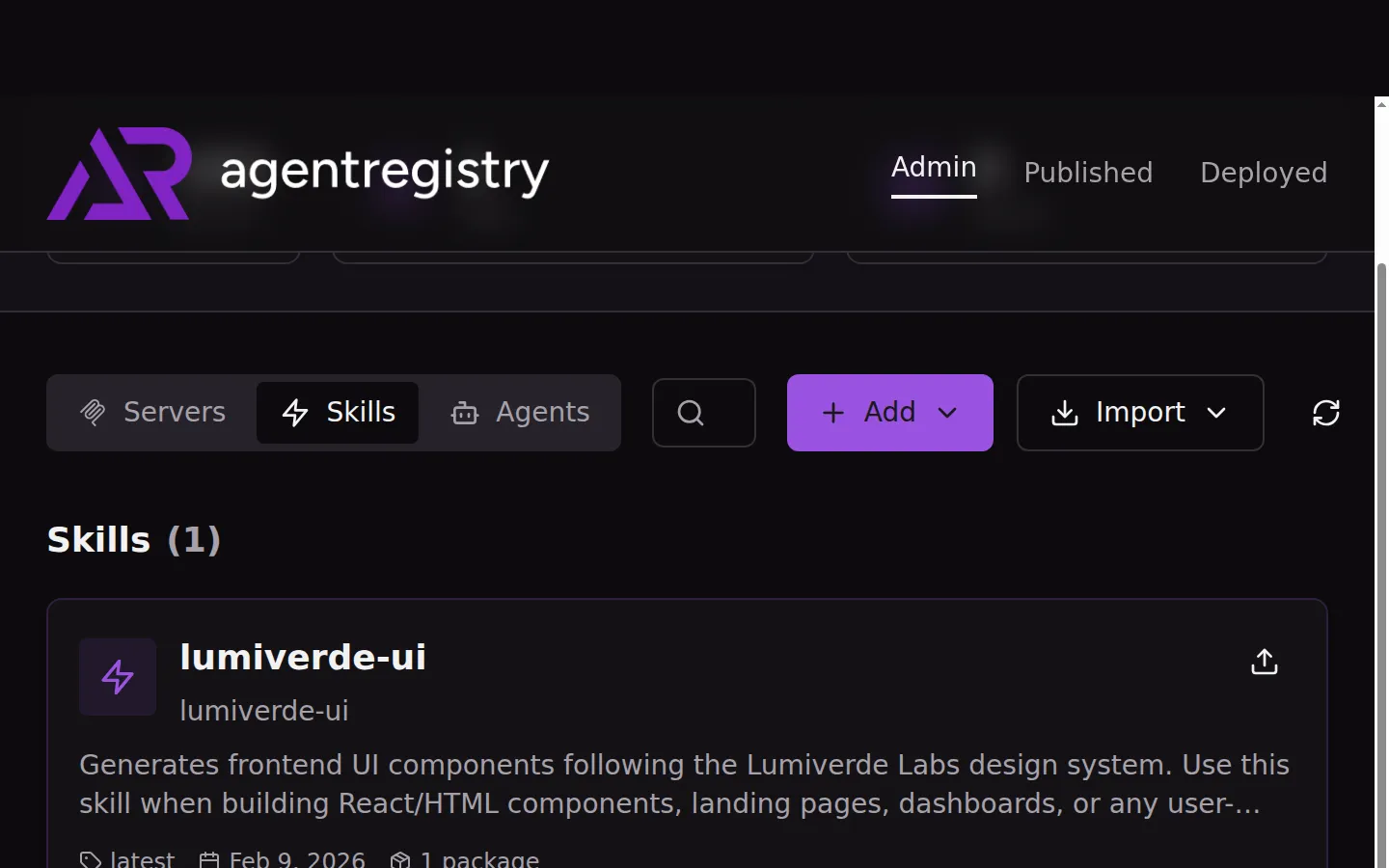
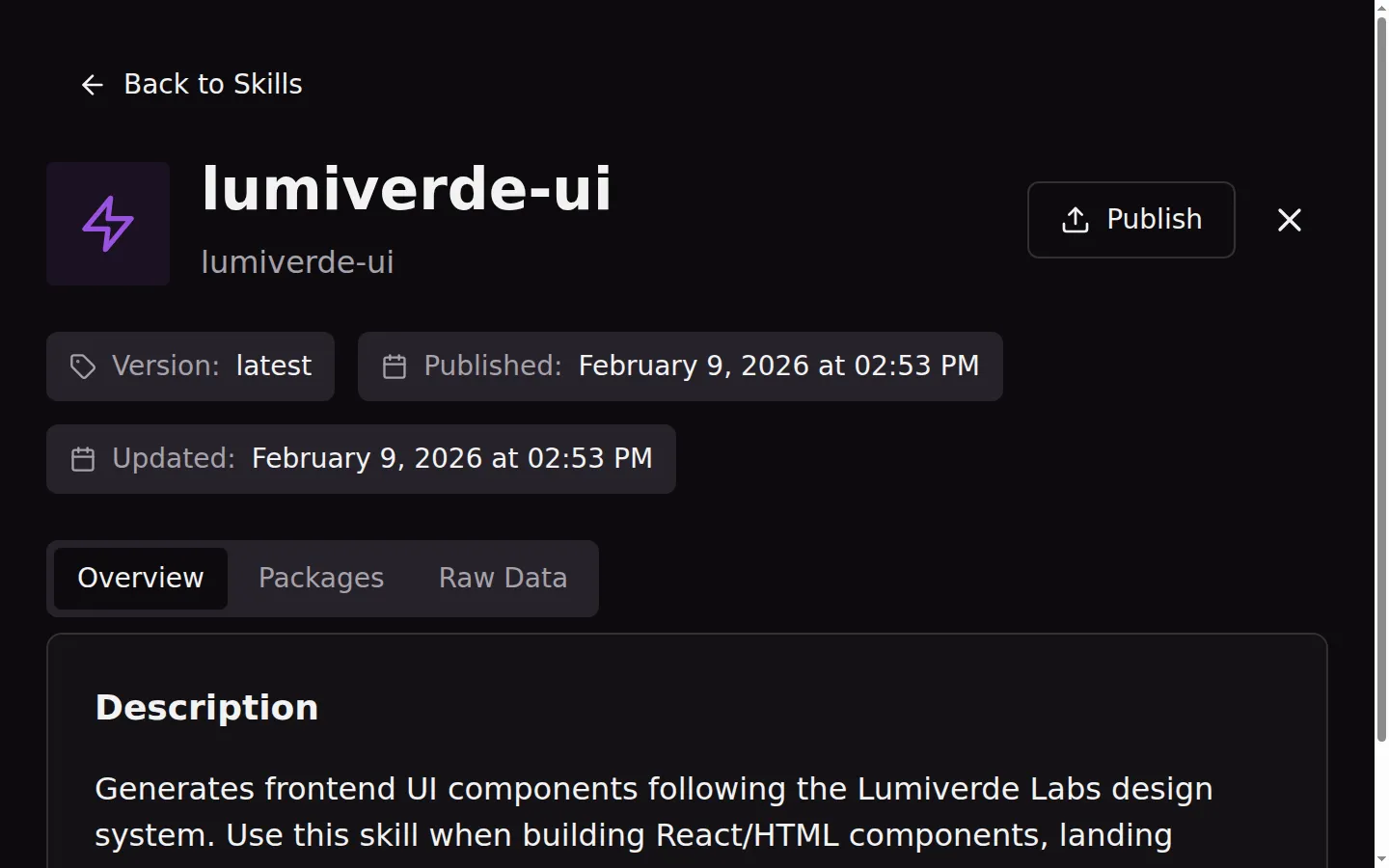
The web UI at http://localhost:12121 provides the same discovery experience with search, filtering, and a detail view that shows the skill’s description, version, package information, and publishing status.
Step 6: Pull the Skill
Consuming a skill is a single command. arctl skill pull fetches the Docker image from the OCI registry, creates a temporary container, extracts the contents, and writes the skill files to the local filesystem:
From your project directory, create the .claude/skills path and pull into it:
$ mkdir -p .claude/skills && cd .claude
$ arctl skill pull lumiverde-ui
Pulling skill: lumiverde-ui
Fetching skill metadata from registry...
✓ Found skill: lumiverde-ui (version latest)
Docker image: localhost:5001/demo/lumiverde-ui:latest
Pulling Docker image...
Extracting skill contents to: .../skills/lumiverde-ui
✓ Successfully pulled skill to: .../skills/lumiverde-ui
One thing to note: arctl skill pull always extracts to ./skills/<name>/ relative to the current directory, which is why you cd .claude first — so the files land at .claude/skills/lumiverde-ui/ where Claude Code expects them. This is a minor ergonomic rough edge; ideally the CLI would have an --output-dir flag.
Once pulled, Claude Code picks up the skill automatically. The SKILL.md lands in the expected directory structure, and Claude Code loads it based on its description when the context is relevant. No additional configuration — the skill is just files on disk, which is all Claude Code’s native skill system needs.
The Result: A Real Before and After
To test whether the skill actually changes Claude Code’s output, we ran two separate sessions with the exact same prompt. The first session ran in a clean directory with no skills installed. The second ran in a directory where we had pulled the Lumiverde skill via arctl skill pull lumiverde-ui into .claude/skills/lumiverde-ui/. Both used claude -p (non-interactive print mode) with identical arguments:
# Without skill — clean directory, no .claude/skills/
$ claude -p "Build a single-page HTML dashboard for Lumiverde Labs, a
  sustainability technology company. The dashboard should show:
  1) A navigation bar with the company name 2) Four metric cards showing:
  Carbon Offset (12,847 tons), Active Sensors (1,284), Energy Saved
  (3.2 GWh), Projects Active (47) 3) A recent activity table with 5 rows
  of sample environmental monitoring data. Use Tailwind CSS via CDN.
  Output a single index.html file."

# With skill — same prompt, but .claude/skills/lumiverde-ui/SKILL.md is present
$ claude -p "<same prompt>"
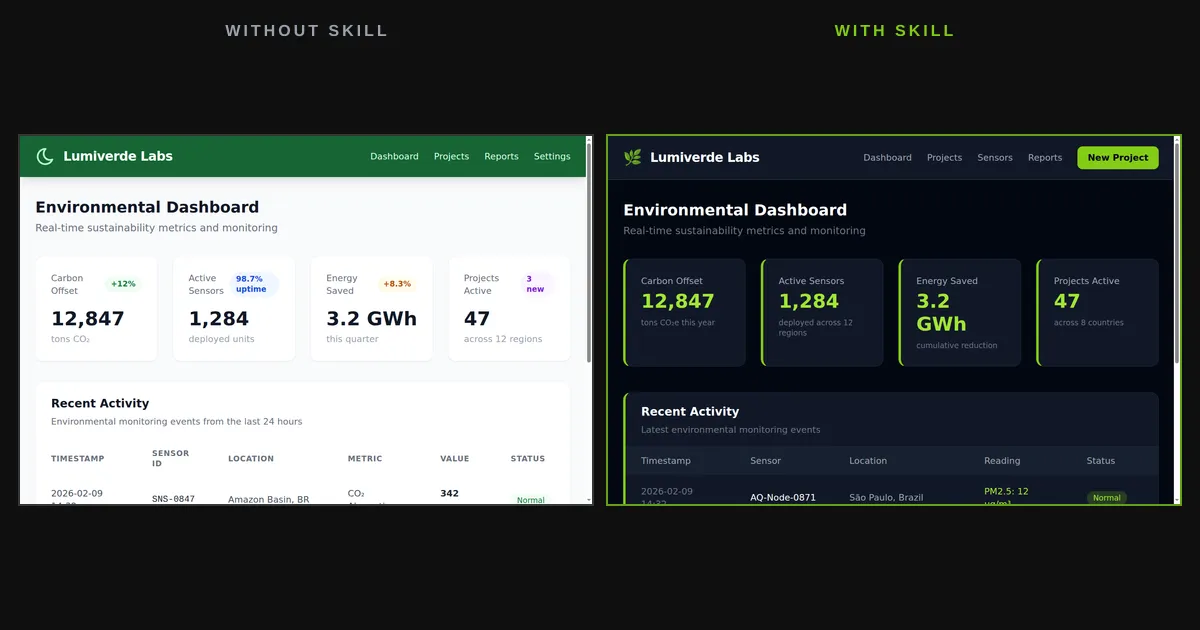
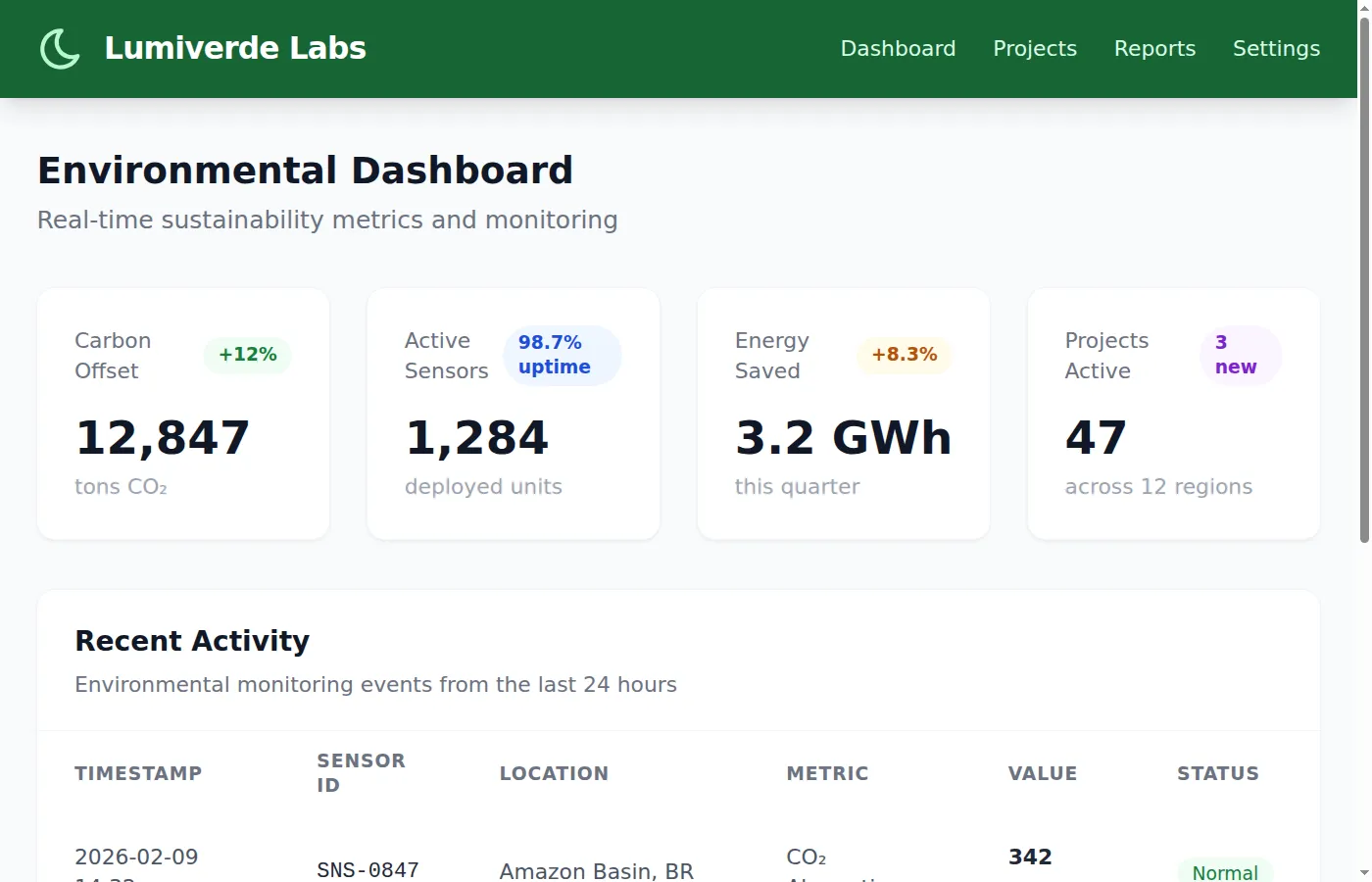
Without the skill, Claude Code produced a standard light-themed dashboard — white card backgrounds (bg-gray-50), a dark green navigation bar, and a custom lumiverde Tailwind color palette it inferred from the company name. The design is clean and professional, with metric values in dark text, subtle card borders, and colored status badges (green “Normal”, amber “Warning”, red “Critical”). Reasonable defaults, but generic:
With the Lumiverde skill loaded, the same prompt produced a dramatically different dashboard. The entire page uses a near-black background (bg-gray-950), dark card surfaces (bg-gray-900), and vibrant lime-green accents throughout. Metric values pop in text-lime-400 against the dark background. Every card carries the mandatory border-l-4 border-lime-500 left accent border from the skill’s design system. The navigation bar is dark with a 🌿 leaf icon and a lime-green “New Project” button. Status badges use translucent lime, amber, and red backgrounds (bg-lime-500/20, bg-amber-500/20, bg-red-500/20) — exactly the pattern specified in the skill’s color system:
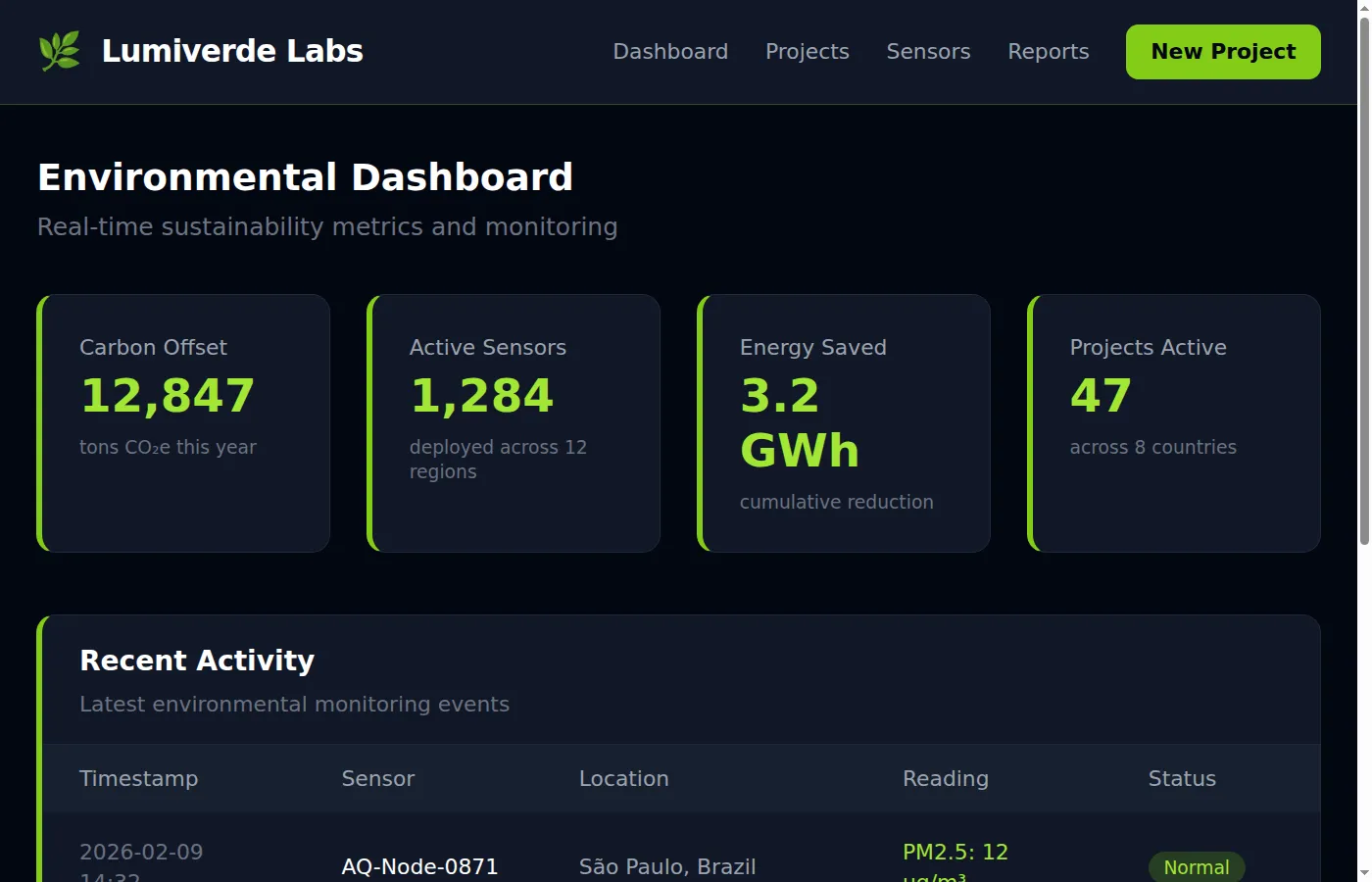
The difference is not subtle. Without the skill, you get a reasonable light-themed dashboard. With the skill, you get a design-system-compliant dark interface that no model would produce unprompted — near-black backgrounds, lime (not green or emerald) accents, translucent status badges, and the distinctive left-border card pattern. The skill’s anti-patterns section (“Do NOT use bg-white or any light background”, “Do NOT use emerald, teal, or green — Lumiverde uses LIME”) steered the output away from the model’s natural defaults and toward the specific brand identity.
For a team, this means consistency. Every engineer who pulls the skill gets the dark mission-control aesthetic rather than a generic light dashboard. The baseline shifts from “whatever the model defaults to” to a governed design system. And as the team iterates on the skill — adding component examples, tightening rules, bundling reference markup — the output converges further.
How the Pieces Fit Together
The architecture has three layers.
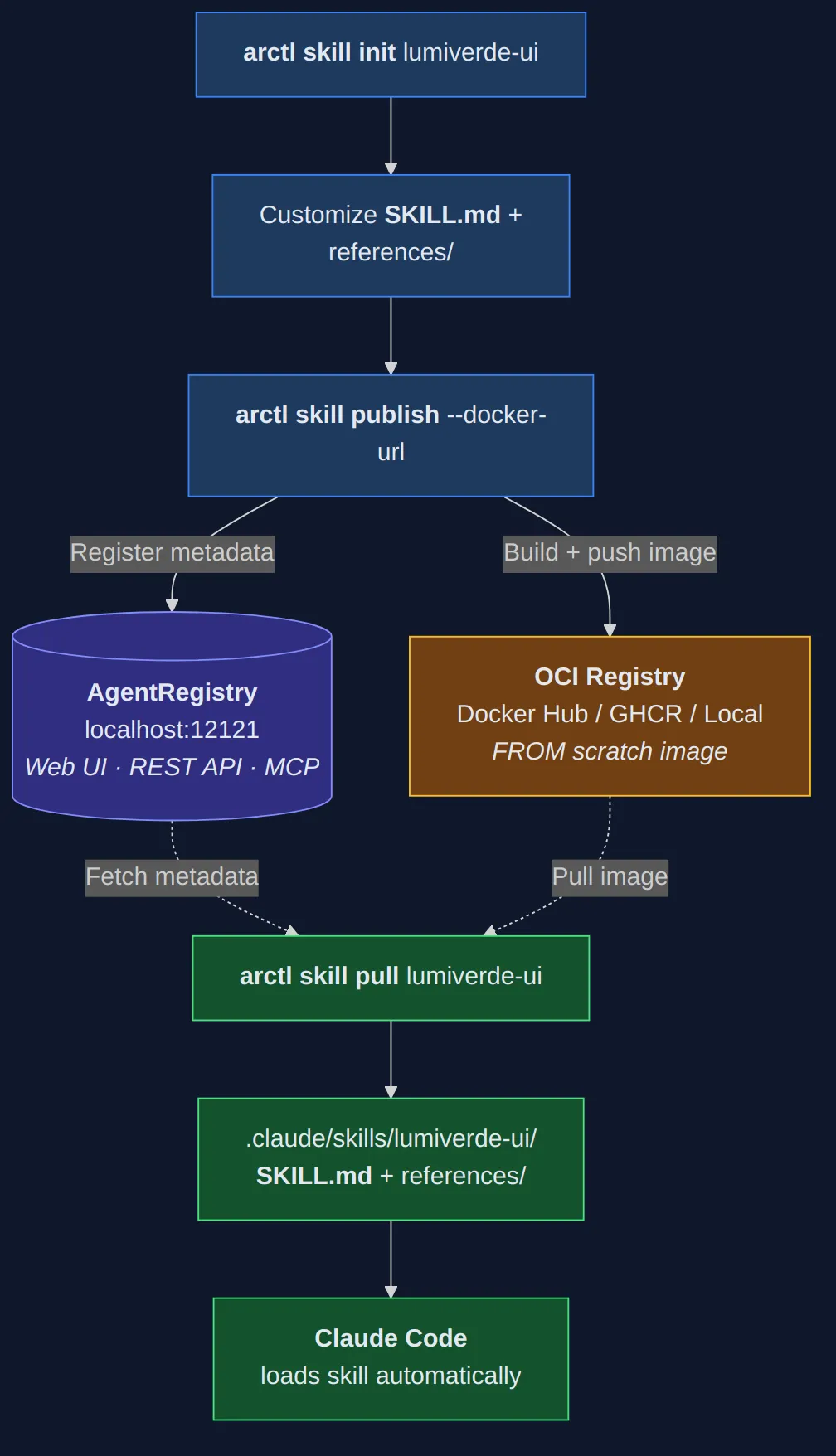
The skill author uses arctl to scaffold, customize, and publish skills. The publish command builds a FROM scratch Docker image containing the skill files and pushes it to an OCI-compatible registry. Simultaneously, it registers the skill’s metadata (name, description, version, package pointer) in AgentRegistry’s PostgreSQL database.
The registry (port 12121) stores metadata and provides discovery through its web UI, REST API, and MCP endpoint. It does not store the skill content itself — only pointers to Docker images in external registries.
The skill consumer runs arctl skill pull to fetch and extract skills to the local filesystem. Claude Code then loads them through its native skill system — no additional configuration required. The skill files land on disk, and Claude Code picks them up based on the SKILL.md description.
This separation of concerns is deliberate. Your OCI registry handles artifact storage with whatever security, scanning, and replication you already have in place. AgentRegistry handles metadata, discovery, and the publishing workflow. Claude Code handles skill loading and execution. Each component does one thing.
The registry also exposes its own MCP endpoint with tools like list_skills, get_skill, and list_servers, so agents can browse the catalog programmatically. For teams managing deployed MCP servers, the separate agentgateway project provides a reverse proxy that aggregates multiple servers behind a single MCP endpoint — but that is outside the scope of this post.
Enterprise Considerations
At v0.1.20, AgentRegistry is iterating fast — 25 releases in 3.5 months — and already ships several governance primitives that matter for teams.
The publish/unpublish model gives operators control over what’s visible in the catalog. The CLI’s arctl skill publish pushes and publishes in a single step, but operators can pull skills back with arctl skill unpublish or through the admin API (/admin/v0/skills/{name}/versions/{version}/unpublish). The underlying REST API also supports a two-phase workflow — pushing a skill as a draft via the push endpoint, then promoting it separately — for teams that want an explicit review gate before skills go live.
Authentication supports OIDC with six distinct permission scopes — read, push, publish, edit, delete, and deploy — mapped to your identity provider’s claims. And because skills travel as OCI images, they inherit whatever scanning, signing, and replication policies you already have on your container registry.
The project is still early-stage, and some enterprise features are on the roadmap rather than in the release. User and team management lives in your identity provider rather than in AgentRegistry itself. Audit logging, skill content scanning, and high-availability deployment are areas where teams adopting today would bring their own tooling. SafeDep’s threat model research on agent skills is worth reading for anyone thinking about supply chain security in this space — the two-phase publishing model provides a natural checkpoint for integrating that kind of scanning.
Worth noting: these are not AgentRegistry-specific gaps. The skills ecosystem as a whole is young. Public skill directories like skills.sh offer discovery but no approval workflows or organizational scoping. AgentRegistry is ahead of most alternatives in providing governance hooks at all.
Getting Started
Installing arctl is a single command:
curl -fsSL https://raw.githubusercontent.com/agentregistry-dev/agentregistry/main/scripts/get-arctl | bashYou need Docker Desktop with Docker Compose v2+ installed. On first run, arctl auto-starts the registry daemon. From there, the workflow we covered in this post applies: arctl skill init to scaffold, customize your SKILL.md, arctl skill publish to package and register, and arctl skill pull on the consumer side to download. The web UI is immediately available at http://localhost:12121.
For a local OCI registry (if you do not want to push to Docker Hub during development), spin up a registry:2 container:
docker run -d -p 5001:5000 --name registry registry:2Then use --docker-url localhost:5001/your-namespace when publishing.
Closing Thoughts
AgentRegistry is early — v0.1.20, sparse docs, and several features still on the roadmap. But the problem it addresses is real: the Agent Skills standard has 27+ adopting tools, and as teams invest in custom skills, the need for publishing, versioning, and access control becomes harder to ignore.
AgentRegistry is the first tool that treats skills as first-class distributable artifacts — OCI images with dedicated metadata management. It is not the only way to share skills (Git repos and Anthropic’s managed enterprise settings both work), but it is the only approach that combines a familiar CLI experience (arctl skill pull) with governance hooks (two-phase publishing, OIDC auth, admin/public API separation) in a single open-source package.
If your team is sharing skills through Slack messages and copied files, AgentRegistry is worth evaluating.